Lose my CD / DVD Drives
Recently I experienced several little problems with my Windows XP desktop. It started with losing the sound and the inability for Skype to answer. After trying various things, I rebooted, which brought back the audio and seemed to have corrected Skype. Unfortunately, I then lost my 2 CD/DVD drives plus one virtual CD/DVD drive.
Losing the virtual drive should have been the clue, which I initially missed. They all displayed in the Systems hardware window, but with error 31 messages. After looking for and installing new or replacement drivers, I still had the same problem. I finally ran across a knowledge base article from Microsoft.
 It's been smooth sailing since the fix.
Losing the virtual drive should have been the clue, which I initially missed. They all displayed in the Systems hardware window, but with error 31 messages. After looking for and installing new or replacement drivers, I still had the same problem. I finally ran across a knowledge base article from Microsoft.
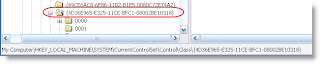
You can no longer access the CD drive or the DVD drive, or you receive an error message after you remove a CD recording program or a DVD recording program in Windows XP: "error code 31"The solution was to delete two apparently corrupt Registry entries and then re-install all software that have a burn CD and/or DVD feature. A pain to go through the re-install, but it did do the trick. Here are the steps to the Registery keys (also available from Microsoft KB article):
- Go to Start Menu >> Run...
- Enter Regedit and click OK
- Navigate to HKEY_LOCAL_MACHINE >> SYSTEM >> CurrentControlSet >> Control >> Class
- Click {4D36E965-E325-11CE-BFC1-08002BE10318}
- Right-click on UpperFilters and select Delete
- Right-click on LowerFilters and select Delete
- Reboot
 It's been smooth sailing since the fix.

Comments
The post that helped me: http://tinyurl.com/4urg8w