USB Headset on Windows 7
I found when I plugged my USB headset (Plantronics DSP 400) into Windows 7, it didn't work. I went through the normal stuff, trying a different port, making sure it wasn't on mute, etc. I finally determined that you need to tell Windows 7 that the headset is your default device before it will work. The good news is that you only have to do it once. Upon removal, it returns back to the external speakers, and upon reinsertion, the USB headset worked again.
To make the changes, the default configuration of the Control Panel makes it nearly impossible to make the settings change. Here are the steps:
To make the changes, the default configuration of the Control Panel makes it nearly impossible to make the settings change. Here are the steps:
- Plug-in the USB headset.
- Go to Control Panel.
- Likely you will see 8 categories, and if you click "Hardware and Sound" you wont find anything to help you.
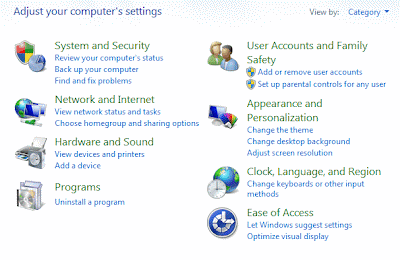
- In the upper-right area of the Control Panel, it says: "Viewed by: Category". Change Category to Small- or Large icons.
- This now presented many Control Panel options.
- Click on "Sound".
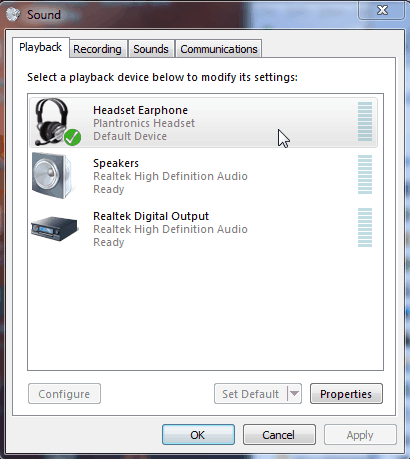
- A window should open into the Playback tab. Speakers likely has a green check mark, while the Headset may have a green phone.

- Select (click) the Headset.
- Click the "Set Default" button.

- Click the Recording tab.
- Again, select the Headset and click "Set Default".
- Click OK.
- Close the Control Panel window.



Comments