Firefox and Google together make a powerful search utility
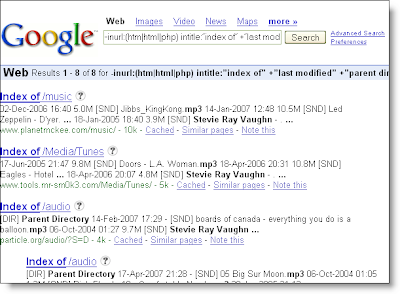
If you have ever explored Google's advanced search capabilities, you would know that it can be very powerful in finding specific content. For example, you can use it to find web directories with music from your favorite artist. Take this code for example, which you can enter into the Google search box:
 You can even add different file formats and wildcards for the search string:
You may recall that by entering a keyword into the field of a bookmark, you can retrieve the bookmark in the Address Box by just entering the keyword. Firefox also supports wildcard parameters, so you can enter a keyword followed by a word, and it will add it to the bookmark. I wrote about this in October 2006. So if we create a bookmark in Firefox, modify our Google string for the Location (URL), and add a keyword, we can then execute the same search directly from the Firefox Address Box.
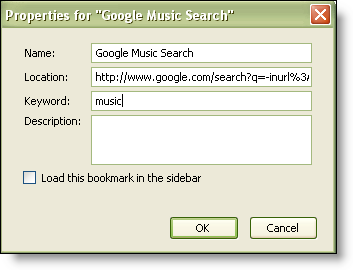 Here are the steps:
 Notice these changes to the URL:
Happy searching!
-inurl:(htm|html|php) intitle:”index of” +”last modified” +”parent directory” +description +size +(wma|mp3) “Stevie Ray Vaughn”Your results would be something like this:
 You can even add different file formats and wildcards for the search string:
-inurl:(htm|html|php) intitle:"index of" +"last modified" +"parent directory" +description +size +(wma|mp3|ogg) "stevie ray vaughn%"How does this apply to Firefox? Well I'm glad you asked!
You may recall that by entering a keyword into the field of a bookmark, you can retrieve the bookmark in the Address Box by just entering the keyword. Firefox also supports wildcard parameters, so you can enter a keyword followed by a word, and it will add it to the bookmark. I wrote about this in October 2006. So if we create a bookmark in Firefox, modify our Google string for the Location (URL), and add a keyword, we can then execute the same search directly from the Firefox Address Box.
 Here are the steps:
- Create a bookmark
- Change the URL as follows: http://www.google.com/search?q=-inurl%3A(htm%7Chtml%7Cphp) +intitle%3A%22index+of%22+%2B%22last+modified%22+%2B%22 parent+directory%22+%2Bdescription+%2Bsize+%2B (wma%7Cmp3%7Cogg)+"%s%"
Note that I added spaces for wrapping -- if you right-click and Copy Link Location (Firefox), you can get the string without the spaces. - Add your keyword, such as: music
- Click OK
- Enter music Stevie Ray Vaughn into the Address Box and press [Enter]
 Notice these changes to the URL:
- All characters are escaped (For example, %3A is a colon [:])
- I replaced Stevie Ray Vaughn with a %s so that Firefox will recognize this as where to insert the value of my parameter (I left the wildcard [%] at the end)
Happy searching!
Comments