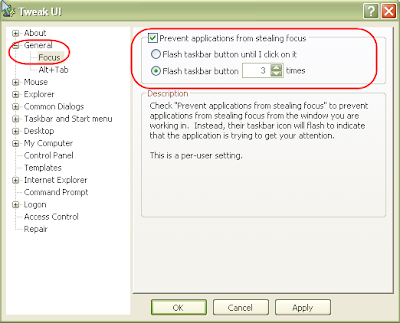
Do you ever have the experience where your typing away, say in Word, and another program pops-up and takes focus, forcing you to click back on the program you were working in? This happens the most to me when a new IM conversation begins in Trillian . It's not a problem once the conversation is going, just for new ones. Where there are a couple of work-arounds to prevent this from happening. Perhaps the easiest is to get Microsoft's Tweak UI to disable it. Look for Focus in the General section of Tweak UI. You can also do this through a registry setting: Start the Registry Editor: Go to Start | Run and enter regedit [Enter] Find HKEY_CURRENT_USER | Control Panel | Desktop Go to the Edit menu and select New > DWORD value Name the DWORD value "ForegroundLockTimeout" Assign a value of 30d40 Close the Registry Editor While your in the Registry Editor, you can also set how many times the Window seeking your attention flashes in your taskbar. This is another setting ...
Comments