View My Computer as a Menu
Have you ever thought it would be easier to find a particular drive if My Computer would display a menu of all drives? Well actually it can do that, with a little configuration change.
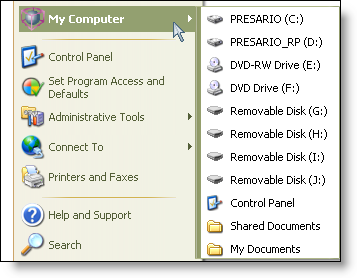

That's all there is to it.

- Right-click on the Start menu, and select properties
- Make sure the Start menu radio button is selected, and click the Customize button next to it
- Click the Advance tab
- Scroll through the list of Start menu items until you find My Computer
- Select the radio button next to Display as a menu
- Click OK twice

That's all there is to it.

Comments
Do you know how to make custom folders to display as a menu?