Look up values in Excel
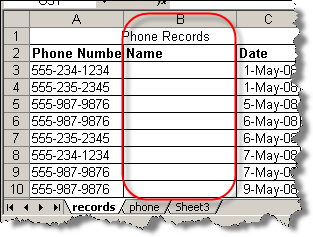
Formula explanation clarified 22-May-08. I recently had the need to compare a long list of values with another list, and for the matches get a value from the same row. For example, if you have a long list of phone numbers and you want to find who they belong to, you could compare the phone numbers to a contact list, and for every match pull out the name. Oh, and if there is no match, you don't want to get an error message, but rather something more intelligent. It takes 4 Excel functions to do this: IF (logical_test,value_if_true,value_if_false) ISERROR : Value refers to any error value (#N/A, #VALUE!, #REF!, #DIV/0!, #NUM!, #NAME?, or #NULL!) INDEX (array,row_num,column_num) MATCH (lookup_value,lookup_array,match_type) Here's how to do it: =IF(ISERROR(INDEX(phone!$B$1:$B$25, MATCH(A8,phone!$A$1:$A$25,0))),"NA", INDEX(phone!$B$1:$B$25,MATCH(A8,phone!$A$1:$A$25,0))) (I used carriage returns for display, this should be one continuous string) phone!$A$1:$A$25 refers to ...


