Open the (DOS) Command Prompt at any Folder
If you're like me, over the years I've started to forget some of those old DOS commands. One that we still need to use occasionally is the cd command to navigate to a file in a different folder, because whenever you go to the Command Prompt you begin in the C:\Documents and Settings\[your username] folder. With a minor entry into your Folder Options, you can actually open directly to the folder you want using Windows Explorer.
Here's how you do it:
1. Open a Windows Explore window (Windows Key + E)
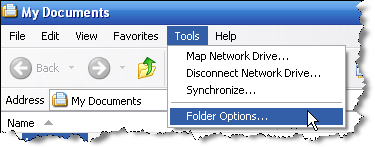
2. Click on Tools
3. Select Folder Options...
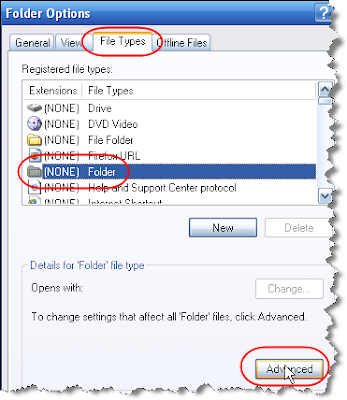
4. Click on the File Types tab
5. Click on [NONE] Folder
6. Click on Advanced
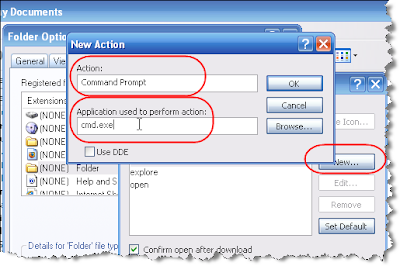
7. Click on New
8. Type "Command Prompt" in the Action box
9. Type "cmd.exe" in the Application used to perform action box
10 . Click OK on each of the dialog boxes until you are back to the Windows Explorer window
Now see it in action:
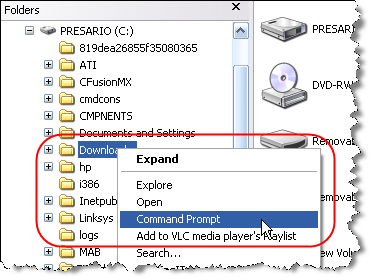
1. Right-click on a folder in the left-pane
2. Click Command Prompt
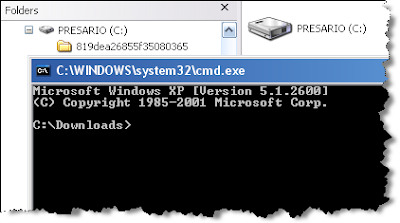
3. You will see a (DOS) Command Prompt window open to the directory of the folder you clicked
Note that if you click on a folder in the right-pane, it will open to the directory of the parent folder.
Here's how you do it:
1. Open a Windows Explore window (Windows Key + E)
2. Click on Tools
3. Select Folder Options...

4. Click on the File Types tab
5. Click on [NONE] Folder
6. Click on Advanced

7. Click on New
8. Type "Command Prompt" in the Action box
9. Type "cmd.exe" in the Application used to perform action box
10 . Click OK on each of the dialog boxes until you are back to the Windows Explorer window

Now see it in action:
1. Right-click on a folder in the left-pane
2. Click Command Prompt
3. You will see a (DOS) Command Prompt window open to the directory of the folder you clicked
Note that if you click on a folder in the right-pane, it will open to the directory of the parent folder.



Comments