Posts

Showing posts from 2010

How to Create an Outlook Forward Rule
Image
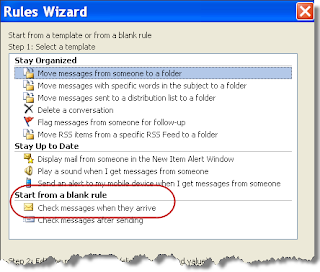
Note: These steps were written using Outlook 2003. Though most if not all versions should support this functionality, it may take slightly different steps in different versions. These steps will describe how to forward an email that contains a specific Subject, e.g. “the subject,” from a specific email address, e.g. "foo@foo.com," to another Outlook user, e.g. "Outlook User." 1. Within Outlook go to Tools >> Rules and Alerts… 2. Click New Rule… This will start the Rules Wizard 3. Select the “Start from a blank rule” option 4. Select “Check messages when they arrive” 5. Click Next 6. Select the two check boxes “from people or distribution list” and “with specific words in the subject.” This puts both phrases in the lower “Step 2” text box. 7. Click on the “people or distribution list” text in the lower box. This will open a new Rule Address dialog box, similar to the standard Address Book dialog box. 8. In the From - > field (at the...

Displaying special characters in your HTML and JavaScript

Occasionally I have the need to display umlauts or other non-standard Latin and Kanji characters in my HTML, JavaScript, and as a URL parameter. Each form have their own rules for encoding the characters to display correctly. HTML: Use the HTML name or HTML number. For example & and " for ampersand and quote, respectively. JavaScript: Use the Unicode equivalent. For example \u00E4 and \u00FC to add an umlaut over an 'a' or 'u', respectively. URL Parameter: Use HEX codes. For example, %20 and %2F for a space and forward slash, respectively. Here's a great reference from ascii.cl for the necessary codes.

Office Ribbon Frustrations: Repeat Rows and/or Columns When Printing in Excel

Image
Excel can be rather confusing. If you try a Print Preview , and then Page Setup , you are unable to set either "Rows to repeat at top" or "Columns to repeat at left". Yet you can set other Page Setup items from this dialog box. To set your row(s) and/or column(s), you need to select Print Titles from the Page Layout ribbon. This will bring up the same dialog box, but now you can choose the row(s) and/or column(s).

Wavee -- not worth the money

Dec 17, 2010: I finally received the email to claim my gift card -- it took 7 emails to Wavee in all before this occurred. On the 7th email, a representative who had not previously responded provided all the necessary information. This was the service I expected with my first email. As far as the gift card itself, many are electronic only. I did order one that had to be mailed -- I'm still waiting for it to arrive. Some of you may be familiar with a new service, Wavee . You bid on items of interest, $0.01 at a time. The highest bidder wins, and gets to purchase the product for the bid price. Sounds good? Well, each bid you make costs $0.75. But consider, an item that sells for $300 took in $22,500 (30000 * $0.75) -- there's 30,000 bids at $0.75 each on an item that sells for $300. So while you spend your money to be the single winner, Wavee's raking in the dough. You can also buy items that are up for auction. In some cases, they offer a discount based on the money already ...

Thunderbird links wont open browser tab

My Thunderbird email client quit opening up links when I clicked them, regardless if they were in an email or from an RSS feed. Turns out the issue was with my web browser. I switched from Firefox as my default to Internet Explorer and it worked again. I then reset my default to Firefox, restarted Firefox, and it responded again, too.

No available system font when editing a PDF

I recently had to make a minor edit to an old PDF that I no longer had the source for. For large edits, there are PDF to DOC converters, but for minor edits I just use Acrobat. With this particular file I got an unexpected error message. All or part of the selection has no available system font. You cannot add or delete text using the currently selected font. Through a little searching I discovered that by selecting and then right-clicking the text, and entering the Properties dialog, I could change the font being used. In this particular case though, there were no system fonts embedded in the document and the only choices were from the original computer that created it -- a Mac. Since I was using Windows, this failed too. Fortunately for me I have Adobe Illustrator. With Adobe Illustrator you can open individual pages of a PDF and using the text tool you can make changes. If you don't have Acrobat or Illustrator and need to edit a PDF, PDFEscape -- a browser-based applet -- will ...

LastPass vs. RoboForm Password Managers

Updated Feb 18, 2011: I've received a few comments from people about the cost to upgrade from RoboForm version 6 to version 7. The issue is that apparently their original purchase was for a lifetime of upgrades. The RoboForm website indicated that any version 6 purchases made after Sep 1, 2010 are eligible for free upgrades to version 7. I don't have my original purchase receipt, so I can't verify the legitimacy of the claim myself. That being said, I cannot imagine a company surviving by charging a 1-time fee of $30. Regardless, the RoboForm product is one of the few products I would pay for again over using any of the current open source solutions available. (BTW: I'm still using version 6, as I have not ran into a situation that requires me to move to version 7.) I've been a user of RoboForm for nearly 4 years, and its allowed me to have secure and unique passwords for all my websites, while only requiring me to remember one. In January 2007, I wrote a post on...

Your Writing Style Impacts Your Users Ability to Find What You Wrote

In my last post, " Our search sucks! Why can't it work just like Google? ", I told you to also consider your content when improving your search. Poor titles and multiple articles on a single subject will impact success. I want to expand on content a bit more. First, consider the search results again. If your search engine displays the first part of the content underneath the title, is the information helpful? Next, when the user does click-through on a search result, can they quickly reassure themselves that the content presented is what they're looking for? I believe if you follow the advice of Tim Ash in his article " Fix Your Writing or Suffer Lower Conversion Rates ," you will be able to satisfy these two issues in regards to your content. Whether you're trying to convert a user to buy your product or you're trying to help a customer fix his problem with your product, the principles still apply. Tim begins, "The vast majority of Internet use...

Our search sucks! Why can't it work just like Google?

"Why can't I find what I'm looking for on my own companies website? I know the document/content is there -- I wrote it. When I use Google I don't have troubles finding what I'm searching for. Why can't we have Google for our website?" (This is a topic I would not typically post on this blog, but it's an often misunderstood issue that is raised frequently within companies -- an issue I've had to address many times.) The short answer, whether searching your companies (public) website or intranet (website), is that your company websites are not like the Internet and therefore the same technology that Google has developed for you to search the Internet will not work for your company. "But Google sells a search appliance for the Enterprise -- why can't I just use that?" Well, you can use Google's Search Appliance, and it may even be better than your current solution, but it wont live up to using Google to search the Internet. I have ...

Analyze your computer and reveal software keys

I've been using Belarc Advisor , a free personal tool for analyzing your Windows computer, for some time now. It will provide a detailed analysis of several items: Installed hardware Installed software and version number Windows Updates, and indicate if any are missing Checks for virus protection and last scan Software keys Software usage (frequency) User accounts and last login What I like best is that it reports the software keys of my installed software. While it doesn't appear to grab all software keys on my personal computer, it lists all of them from my work computer including Microsoft, Adobe, Corel and TechSmith. I recently used it before rebuilding my Dad's computer. In addition to being certain to have his software license keys, I was able to also view what programs he hadn't used in sometime -- therefore I didn't reinstall them. Considering adding more RAM to your PC? Instead of taking the cover off to do a visual inspection, use Belarc Advisor to identi...

McAfee On Access-Scan Disabled

Image
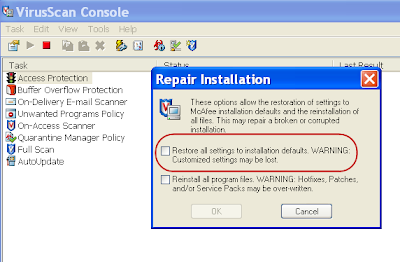
I noticed this morning that my McAfee On Access-Scan was disabled. (The shield in the system tray had a red-crossed circle.) When I opened McAfee, it was performing a scan, so it wasn't clear what was occurring. After some research, I found that the settings may have become corrupt. Here's the steps to correct: Go to VirusScan Console >> Help >> Repair Installation. Check the fist check-box to reset to the default settings. Click OK. This should do the trick.

USB Headset on Windows 7

Image
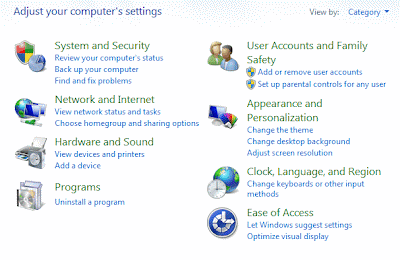
I found when I plugged my USB headset (Plantronics DSP 400) into Windows 7, it didn't work. I went through the normal stuff, trying a different port, making sure it wasn't on mute, etc. I finally determined that you need to tell Windows 7 that the headset is your default device before it will work. The good news is that you only have to do it once. Upon removal, it returns back to the external speakers, and upon reinsertion, the USB headset worked again. To make the changes, the default configuration of the Control Panel makes it nearly impossible to make the settings change. Here are the steps: Plug-in the USB headset. Go to Control Panel. Likely you will see 8 categories, and if you click "Hardware and Sound" you wont find anything to help you. In the upper-right area of the Control Panel, it says: "Viewed by: Category". Change Category to Small- or Large icons. This now presented many Control Panel options. Click on "Sound". A window should open...

Useful Windows Utilities

I ran across a few useful, free Windows utilities today, all from Mike Lin . Though he created these years ago, I found them still helpful. Startup Control Panel : This tool installs in your Windows Control Panel and allows you to disable programs that are configured to start on Startup. In October 2006 in my XP Memory Problems and Startup Applications post I wrote about a similar program, Startup Inspector , which I've continued to use. I like Startup Control Panel a little more, but they both should work for you. StartUpMonitor : The purpose of StartUpMonitor is to monitor programs on install and notify you before they add a new Startup program. While I haven't used it yet, I like this idea as I can catch these before they get into my system instead of having to use Startup Control Panel or Startup Inspector after the fact. Clipomatic : Clipomatic will keep a "clipboard" of your copy/cut text, so you can access and reuse items clipped long after you've made new...

Mapping HTML files to run Classic ASP on IIS7

I found that IIS 7 on Windows 2008 Server to be much different from prior versions of IIS. The first hurdle was to realize that Classic ASP isn't installed by default. In searching board posts to solve my issue, I found countless posts with directions to install Classic ASP. So getting this far, I was unable to process my HTML files that had embedded Classic ASP code, In prior versions of IIS, you could just add *.html to the previous defined *.asp listing. With IIS 7 though, this created problems with the .asp pages, and did not solve the issue either. The trick is to make a new entry in the HandlerMappings specifically for *.html. Request path: *.html Executable: %windir%\system32\inetsrv\asp.dll Name: anything meaningful to you Mapping: File Verbs: GET,HEAD,POST Access: Script Once you've completed this... Go to %windir%\system32\inetsrv\config\applicationHost.config file Find the new entry (search on the name you set in the HandlerMapping) Remove the preCondition port...

Office Ribbon Frustrations: Working with Pictures

Image
Here's another frustration in learning Microsoft Office's new ribbon interface. I wanted to compress my PowerPoint images -- something I've always done to reduce the file size of my PowerPoint. I searched and searched for some indication of how I might do this. I finally discovered that I must select an image, and magically a new menu appears. The words "Picture Tools" appears in the Title Bar, and below it is a Format menu. Upon clicking Format, I revealed several options for manipulating the image, including "Compress Pictures". The Microsoft website covers file compression and other picture manipulation functions .

Sync Your Outlook Contacts and Calendar to Your Droid

As nice of a phone as the Droid is, its Outlook integration is not yet up to what you can accomplish with the iPhone. Previously I blogged about how to get your Outlook email onto your Droid , as the instructions that come with the Droid are not clear. The rest of this post will tell you how to sync your Calendar (events) and Contacts between your Droid and Outlook. It takes three things to make this work. Compatible version of Outlook: Outlook 2003 or 2007 on Win XP (32-bit only) and Vista. Gmail account: You should already have this, since it's required for the Droid. Google Calendar Sync application: The Google Calendar Sync program will sync your calendar and contacts between your Outlook account and your Gmail account -- your Droid can interact with your Gmail account. Download this from Google onto your computer that's running Outlook. Once you've downloaded the Google Calendar Sync program, install it. Just a few simple steps, and you'll have your Contacts a...

Office Ribbon Frustrations: Use the Quick Access Toolbar

Image
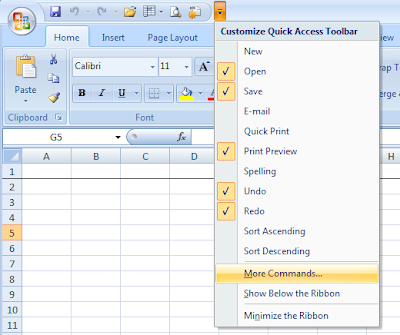
I continue to find new and frustrating things when using Excel 2007. For example, in most spreadsheets I want to freeze the top row and sometimes columns. To do this, I need to remember that I first need to go to the View Ribbon. If I want to use a Macro, it's not on the Insert or Data Ribbon, as I expected, but it is also on the View Ribbon. For Print Preview, you need to go to the Office Button and select the Print arrow. Needless to say, some of the most common tasks I perform are now hidden and/or further clicks away. One way to make some of these tasks easier is to use the new Quick Access Toolbar. The Quick Access Toolbar is the toolbar just right of the Office Button, above the Ribbons. By clicking the drop-down arrow to the right of the toolbar, you can customize the toolbar with your favorite shortcuts. Here's how to customize the Quick Access Toolbar. Click the drop-down arrow to the right of the Quick Access Toolbar Click on "More Commands...". This should ...

Block Offensive Facebook Ads

Image
Updated May 6, 2010, due to new information. Are you tired of giving Facebook feedback on offensive ads, and yet they keep re-appearing? Just because I'm single doesn't mean I want to continually see ads to meet women! In general, I believe displaying ads in an unobtrusive way is okay, as it is what helps pay for free websites. But why even offer a feedback mechanism, if you're not going to incorporate it into future ads? Well I did some digging, and found a Firefox Add-on, Adblock Plus, that will block ads. Adblock Plus will work well beyond Facebook, but so far I've only configured it to block Facebook ads. The easiest way to make this work is to also install the Element Hiding Helper Add-on too. Here's the steps: Download/install Adblock Plus Add-on . Restart Firefox. Download/install Element Hiding Helper Add-on . Restart Firefox. You should have a new ABP icon to the right of the Firefox Search Box. Login to Facebook. Click the down arrow and click "Select...

View and Manage Your Social Networks in One Place

Update Aug 25, 2010: After 3 1/2 months of using Yoono, I've removed it from Firefox. It had a tendency to crash Firefox, particularly if it contained a lot of unread messages. In addition, it quit updating my Facebook feed, except for notices, around the 1st of August. I've switched back to TweetDeck and Trillian. Earlier this week I installed Yoono's ( Yoono.com ) Firefox Add-on, as a test to see if it can successfully be used to manage all my social networks. Today I removed my other client tools from my auto-start, as I have been very happy with Xoono. As I mentioned, Xoono is a Firefox Add-on (it's also available for Windows desktop) that you can use to manage all my social network interactions. It supports Facebook, MySpace, LinkedIn, Twitter, Flickr, FriendFeed, and 4 instant messaging (IM) clients: AIM, Yahoo, Google Talk, and MSN. Each of these can show in one feed or you can select a tab to see the individual feed. I have been using 3 of the social feeds (Fac...

Office Ribbon Frustrations: Document Properties

Remember it used to be easy to look in the File menu and find the document properties of an Office document? This was an easy way to make sure you didn't post documents with personal information you didn't want shared. In Office 2007 the feature still exists, it's just hidden like so many other things. Click the round Office icon in the upper-left Click Prepare Click Properties You will also find in this menu the Inspect Document feature, where you can do further analysis and clean up of a document, including the items found within the document properties.

Get Exchange (Outlook) Email on your Droid

With my new Droid, it was extremely easy to get my Gmail, but I found the instructions for getting Exchange email not so clear. It's actually quite easy once you realize what's being asked -- the key is it's the same as your Outlook Webmail. Here's what you need to do: Click/Open the eMail App and choose Add Account. Enter your Outlook email address and password. If you want this to be your default email, be sure to check the box before clicking next. Select Exchange from the account type options. Complete the following Domain\Username : This will likely have your email username as entered in step 2. It may not be the same as your network username, which is required here. Most of us don't have to remember our domain, except when using Webmail, e.g. mydomain\myusername. Password : The password you use to login to your corporate computer, and therefore your email. It should also be the same password you use when retrieving Outlook Webmail. Server: This will likely ha...

Switched from iPhone to Droid for $20

With my contract expiring on AT&T I found myself in the market for a new cell phone. I could have waited for the next iPhone, by continuing month-to-month, but I really wanted to move to a 3G connection. With the announcement of the new iPhone OS only working on the 3GS, I had to spend $200 (and a 2 year contract) to get it. I'm not sure why with the threat of switching carriers that AT&T didn't have a better offer. From my research and testing a few Droids owned by 3 friends, it seemed like a good alternative to the iPhone. In speaking directly with Verizon, they too could only offer me a $200 Droid with a 2 year contract, so it didn't offer anything better. Then in searching Amazon, I found that I could get it for $20 on a 2 year contract. It's now been a few weeks, and I'm very happy with it. While the Droid has its own quirks, they're no worse than the iPhone quirks. There also is a promise to bring Flash to the Droid, which is a lot closer than Flas...

Portions of a PDF don't print

I recently have had two cases where a portion of a PDF file that I saw on screen didn't print. Both documents had inserted signatures among other things. When I opened the file in Acrobat and Illustrator, I could see there were multiple objects. It was some of the objects that were not printing. I figured I should be able to solve with Illustrator, but never came up with a solution using it. Back in Acrobat, I saved the PDF as a Word document. Then from Word, I created a new PDF. Now my new PDF was complete and it printed everything that I saw on the screen.

Fonts not displaying or printing correctly

Image
Ever have a Word (or other) document given you by someone else, and it didn't display the fonts correctly? Perhaps they sent you a PDF or image of the file, and it displayed correctly there, but not in the file that you want to now update. The first thing to check is to make sure you have the same fonts on your system. An easy check is to look at the font list in your application. For example, if you're supposed to display Frutiger 45 Light, but its not in the list, then it's likely not installed. If you don't have the font, and can get access to it, Microsoft has a process for installing it to your Windows machine. In some cases, you may have the font, but it still doesn't display correctly nor is it in the list of fonts in your application. This is likely due to the original file being created on a Mac. It may even occur in some applications, such as Word or QuarkXpress, but not in others, such as Photoshop. The reason is that Windows uses style-linking, while th...

iTunes 9.1 on Windows 7 (x64) fails on update

Perhaps like me, you accepted the prompt when iTunes notified you that 9.1 was available for updating on your Windows 7 (x64) computer. After the rather large download though, the installation failed. Trying again later ended with the same results. I found some reports of this occurring on 32 bit Windows 7 and on Vista. From what I could gather, it appears to occur due to a conflict with the version of Bonjour that is already installed. (Bonjour is Apple's service discovery protocol, and is used by iTunes to find shared music on your network.) I was able to successful perform a manual update. Download iTunes 9.1 for Windows (64 bit) Close iTunes Run the install When I ran the install, it reported that my version of Bonjour was newer than the version within the install package, but it didn't cause any issues. (Note, I had previously installed the Bonjour Print Utility in troubleshooting a previous problem with my wireless modem and Apple TV. That fix ended up needing a firmware...

Share files across computers across the Internet

I recently had a case to share a few free eBooks with a friend in Europe. The files were large enough that sharing over email wasn't practical. My friend introduced me to Dropbox , a service that allows me to store up to 2GB of files for free, and I can designate a folder to share with him (or others). Dropbox goes beyond just file sharing though. With their client application (Windows, Mac, and Linux), I can have my Dropbox folder sync across computers. Therefore if I add a file on computer A, it will automatically sync to computers B and C. And if I want to access one of my files from any computer, I can just login to Dropbox and get to my files. Now that I've used Dropbox for a few weeks, I have detected one thing to be cautious of. It has a feature to perform a LAN check -- before sync'ing out to the Dropbox servers, Dropbox checks your LAN. This is an optional feature, that defaults on. What I found is that it though my WAN connection was part of the LAN, and it signif...

Create 2nd Set of HP/Compaq Recovery Disks

Once upon a time, some 5 years ago I got a new Compaq PC. I diligently created restore disks, in case the hard drive ever crashed. Fast forward to the present, and I started having boot problems due to a hard drive problem. Fortunately I had an automated backup running every day and I made my restore disks. Uh oh, I couldn't find my disks. No problem, I'll make more. Err, it wont let me make more! Huh? Google to the rescue! After many searches and poking into newsgroups, I found a promising lead. I either had to delete 3 instances of hpdrcu.prc on the restore drive (D:\) or HPCD.SYS located on the restore drive and in C:\windows\SMINT. Upon looking at the restore drive, it was locked down, so I couldn't get to the file. Fortunately I found a utility, FreeCommander , that ignored the Windows locks and tricks. After renaming the files (never delete until you know you have the right files), I was able to successfully run the CD Creator utility and create a new set of recove...

Unable to Sync iPhone and Unable to Sync Photos to iPhone

Another issue I found moving my iTunes and iPhone to a new PC, was Sync'ing was hanging, though I did have my Apps, Podcasts, and Music. Upon further investigation, I discovered that if I did not sync my photos, then it no longer got stuck. First I was thinking it was a permission issue with Windows 7 -- but I made no progress. I finally figured out how to solve the issue. Stop the sync'ing Delete the iPod Photo Cache in my photo folder(s) Resync I can only assume the iPod Photo Cache had pointers to the location of my photos on my old computer.

Stop Unwanted Programs from Starting in Windows 7

Regardless of the OS, some programs insist on loading themselves every time you start your computer. The most friendly ones will have a configuration option, while others will use the Startup folder. Unfortunately some are even more sneaky. All but the very worst offenders can be managed through msconfig , the same program we used with Windows XP. Go to the Run... dialog and type in msconfig to launch it. If Run... isn't in your Start menu list, try searching for it. This opens a System Configuration dialog box. Within the dialog box, go to the Startup tab. Search through the tab and uncheck any programs you do not want starting up each time you reboot. You're prompted to restart your computer, but its not required. Just manually kill the ones that started the last time, and next time they wont come back.