For years I had used this space as my own personal knowledge base and to share tech news of interest to me. More recently I've moved to share some of my experiences from my very successful career with scaled-support and as a leader and manager.
Before you buy a gift card, check this list
Get link
Facebook
X
Pinterest
Email
Other Apps
-
Many stores have plans to close some or all locations after the Christmas holiday. Before you buy that gift card for little Johnny, better check out whether they'll still be around.
I had a fresh install of CorelDRAW X4, and each time I tried to start it, it would crash. After some searching through Google, I found the following fix. Open the folder C:\Program Files\Corel\CorelDRAW Graphics Suite X4\Programs\UIConfig\CorelDRAW Edit DrawUI.xml Find the line <dockpage guidref="bc1e2f70-3b58-41cd-8406-aaa550482972" visible="true" selected="true"> Change visible="false" and remove selected="true" <dockpage guidref="bc1e2f70-3b58-41cd-8406-aaa550482972" visible="false"> Save and close DrawUI.xml Fold down F8 and restart CorelDRAW X4 When prompted to update settings, select OK That did the trick for me. Apparently it is caused by a conflict with MFC dlls that are installed (version 1833) with SQL2008.
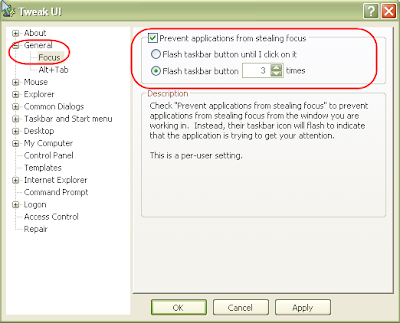
Do you ever have the experience where your typing away, say in Word, and another program pops-up and takes focus, forcing you to click back on the program you were working in? This happens the most to me when a new IM conversation begins in Trillian . It's not a problem once the conversation is going, just for new ones. Where there are a couple of work-arounds to prevent this from happening. Perhaps the easiest is to get Microsoft's Tweak UI to disable it. Look for Focus in the General section of Tweak UI. You can also do this through a registry setting: Start the Registry Editor: Go to Start | Run and enter regedit [Enter] Find HKEY_CURRENT_USER | Control Panel | Desktop Go to the Edit menu and select New > DWORD value Name the DWORD value "ForegroundLockTimeout" Assign a value of 30d40 Close the Registry Editor While your in the Registry Editor, you can also set how many times the Window seeking your attention flashes in your taskbar. This is another setting ...
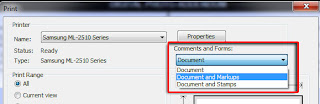
Trouble getting the digital signature in a PDF to print? The solution is actually simpler than you might think. With your document open in Adobe Acrobat Reader, click File >> Print. When the Print dialog box opens, look for the "Comments and Forms:" drop-down below the Properties button, located in the upper-right. Click the drop-down and select "Document and Markups." Now print. That's all there is to it.
Comments